In this demo you will use an OpenZiti SDK to access a private instance of the swagger petstore API. This demo will cover:
Initializing Context
2. Calling a Service
3. Reading a Response
Getting Started
Just choose your favorite programing language below, and paste the code into the terminal of your choice
Java
GoLang
Python
Java
Run the Example
Requirements * JDK 21 or later
					git clone https://github.com/netfoundry/taste-of-ziti.git
cd taste-of-ziti/java/petstoreClient
./gradlew clean build run
Look at the Code
1. Loading an identity:
The Ziti SDK needs to be initialized with a strong identity. This is done via the Ziti.init method:
Ziti.init(identityFile, "".toCharArray(), false);
2. Calling a service:
Calling a service means asking the OpenZiti overlay network for a connection. The Java SDK can look at the domain name of network requests and automatically dial the service for you.
OpenZiti defines a service at the dns name “petstore.ziti”.
					final Request httpRequest = new Builder()
          .url(String.format("http://%s:%d%s", "petstore.ziti", 80, petstoreQuery))
          .header("Accept", "/")
          .get()
          .build();
3. Reading the result:
This looks exactly the same as reading the result from any HTTP request in Java.
					final Response response = client.newCall(httpRequest).execute());
String result = response.body().string();
GoLang
Run the Example
Requirements * go 1.21 or later * gcc compiler
					git clone https://github.com/netfoundry/taste-of-ziti.git
cd taste-of-ziti/golang/petstoreClient
go run .
Look at the Code
1. Loading an identity:
The Ziti SDK needs to be initialized with a strong identity. This is done via the ziti.NewContextFromFile method:
ctx, err := ziti.NewContextFromFile(identityFile)
2. Calling a service:
In GoLang, we replace the “DialContext” of the httpTransport with one that “Dials” the target address using OpenZiti. The address is just the name of the OpenZiti service:
The Ziti SDK needs to be initialized with a strong identity. This is done via the openziti.load method:
openziti.load(DEFAULT_IDENTITY_FILE)
2. Calling a service:
Calling a service means asking the OpenZiti overlay network for a connection. With the OpenZiti Python SDK, the easiest way to to do that is using Monkey Patching. Read more about it in the OpenZiti github documentation here.
					with openziti.monkeypatch():
        print('Querying petstore over openziti with query: ' + query_str)
3. Reading the result:
This looks exactly the same as reading the result from any other requests call:
					r = requests.get("http://petstore.ziti" + query_str)
        print(r.text)
TAKE A CLOSER LOOK
How does this demo work?
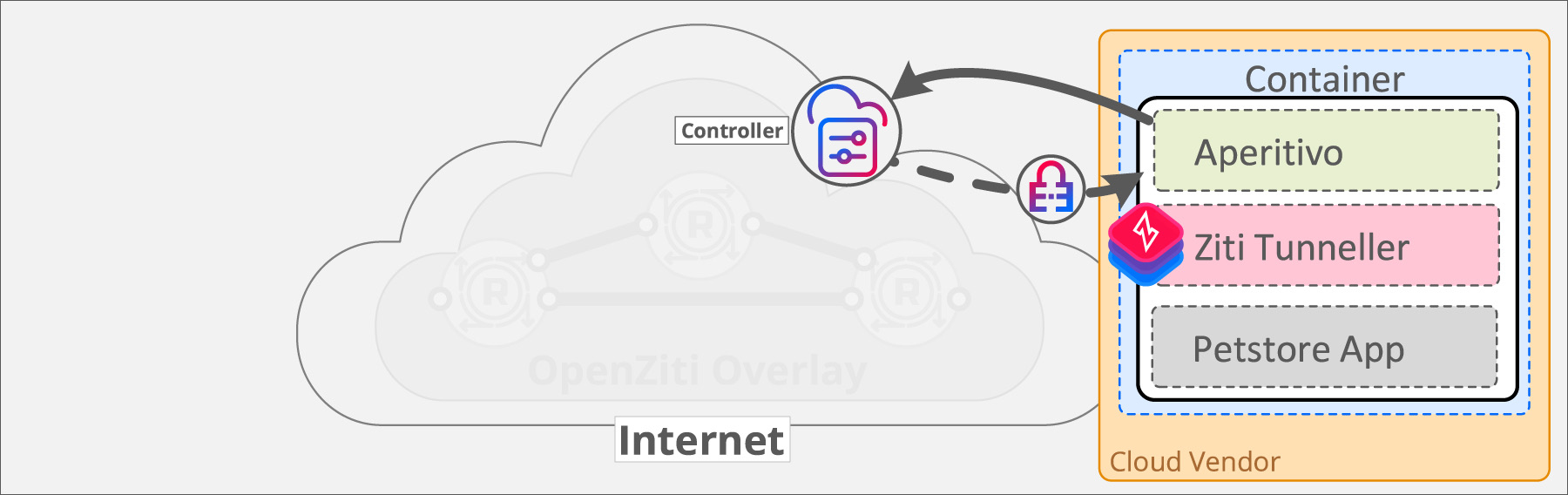
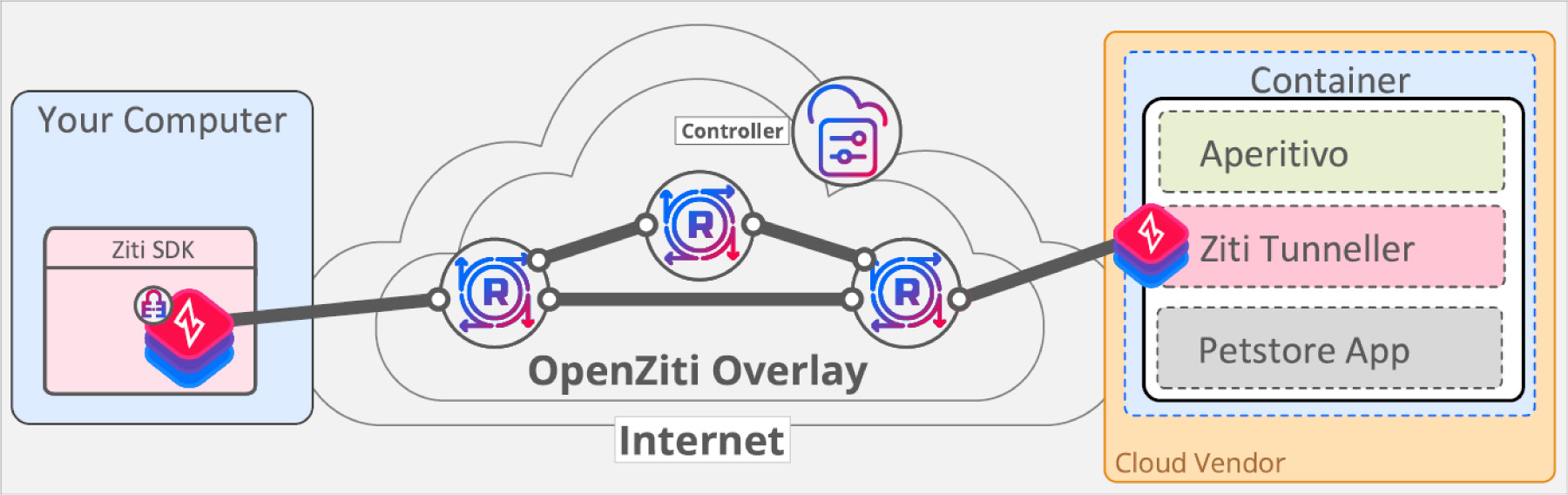
Step 1 - Tunneller strong identity: The OpenZiti Tunneller is configured with a strong identity, represented by the lock icon. This strong identity is authorized to "bind" the PetstoreDemo service, creating a listener.
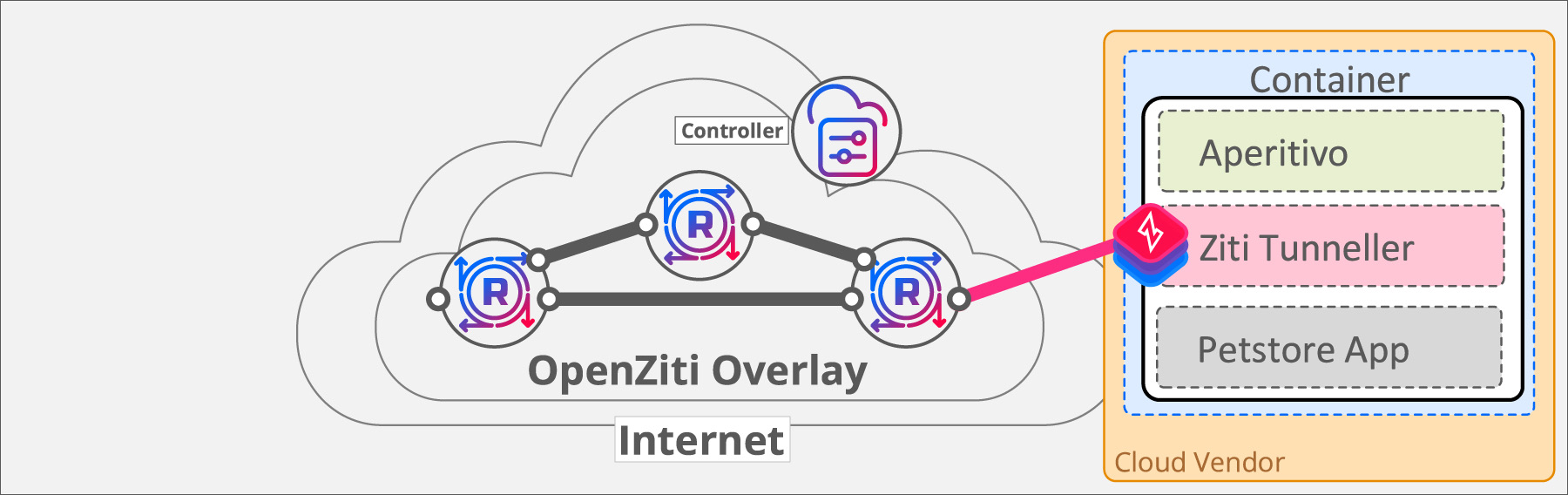
Step 2 - Tunneller connects to the OpenZiti Network:
Now the OpenZiti Tunneller is ready to connect to the overlay network. The Tunneller locates any/all routers it's authorized to connect to and attaches to the overlay network using its strong identity.
The OpenZiti tunneller will bind the PetstoreDemo service once connected. Following the principle of least privileged access, the PetstoreDemo service is only available to strong identities that have been explicitly authorized.
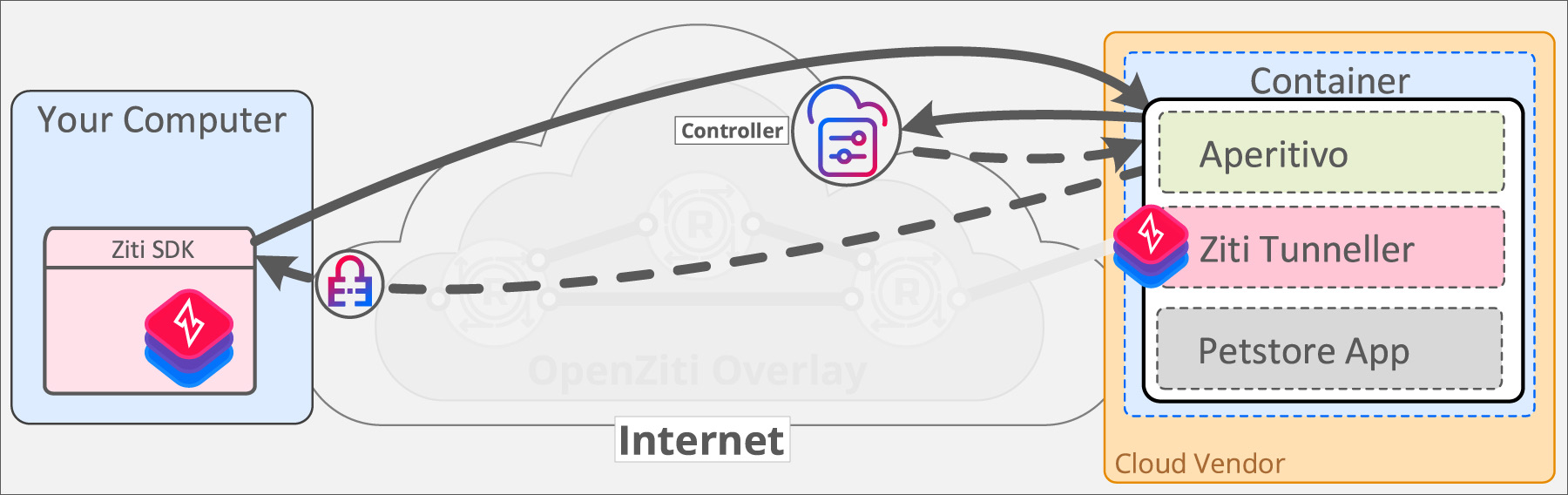
Step 3 - SDK strong identity:
Your SDK also needs a strong identity. You won't be able to connect to the PetstoreDemo service if you are not authenticated to the OpenZiti overlay, and you can't authenticate to the overlay without a strong identity!
The Aperitivo service exposes a public endpoint which creates strong identities authorized to connect to the PetstoreDemo service.
The sample SDK will automatically make an HTTP request to retrieve a strong identity if it does not have one already.
Step 4 - SDK connects to the OpenZiti Network:
Your SDK now has its own strong identity and can connect to the OpenZiti overlay. Both the SDK and the Tunneller established connections to routers deployed on the public, open internet. Requiring only outbound connections to edge routers means absolutely no inbound firewall holes are needed.
The Tunneller has no listening ports in the underlay network. It listens for connections exclusively on the overlay network! This gives any OpenZiti service total protection from port scanning.
Step 5 - SDK communicates securely with the PetstoreDemo service:
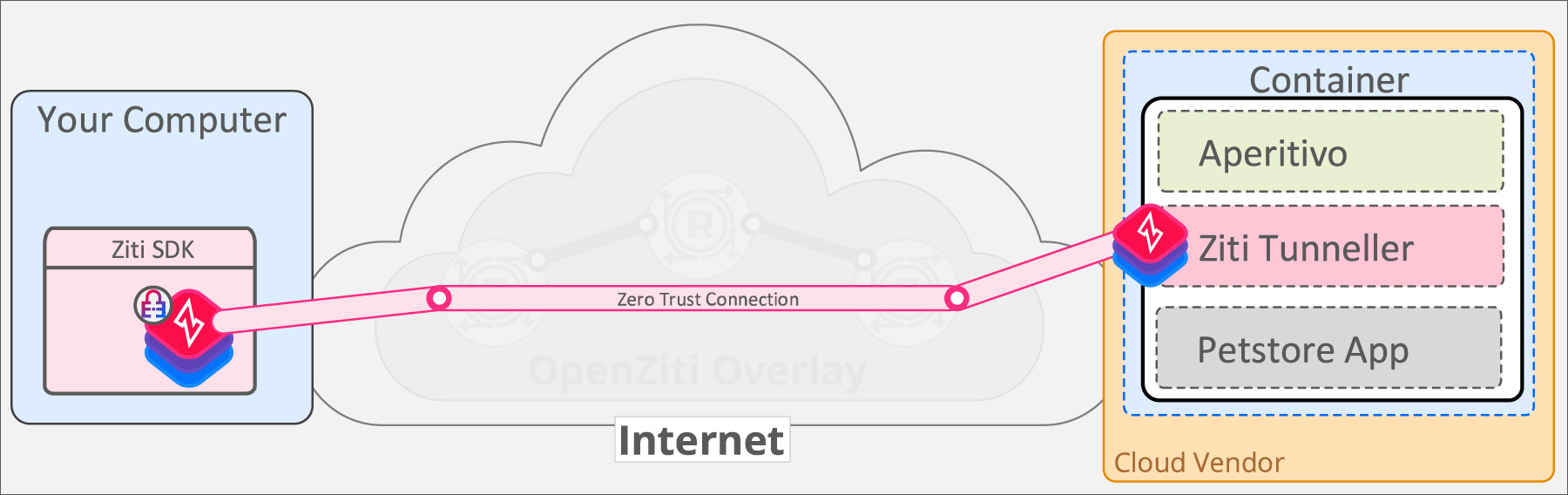
The SDK securely dials the PetstoreDemo service over the OpenZiti overlay. The client can connect and the server can accept the connections because both are now authenticated and authorized.
The communication between the SDK and the PetstoreDemo service is encrypted end-to-end over the OpenZiti overlay. The keys for encrypting and decrypting traffic exist only at the SDK and the Tunneller. No other components of the OpenZiti network have the keys to decrypt or inspect the traffic in any way.
The OpenZiti overlay applies continual authorization to every connection. Data transfer from the SDK to the DemoService is terminated if authorization for either strong identity is revoked.
What You Get by Adopting an OpenZiti SDK
Strong Identity
You need to be confident all entities on your network are who they claim to be, and tightly control access to your network
Completely Dark
No open ports! Your application should be “dark”, meaning no inbound ports to your applications and services are available for direct attack
Segmented Access
Access to services on your network needs to follow a “least privileged access” model, allowing access only to exactly what is needed to help mitigate against lateral attacks
Continuous Auth
Things change constantly. An auth event that is valid at one point in time may not still be valid in the face of changing event
End-to-End Encryption
Only your application and endpoints should be able to access private data.